

When creating a new website or making complex changes, you may need to temporarily hide the site behind a coming soon page.
With Pro Radio, you don’t need third-party plugins: you can create a coming soon page with a fully customized design.
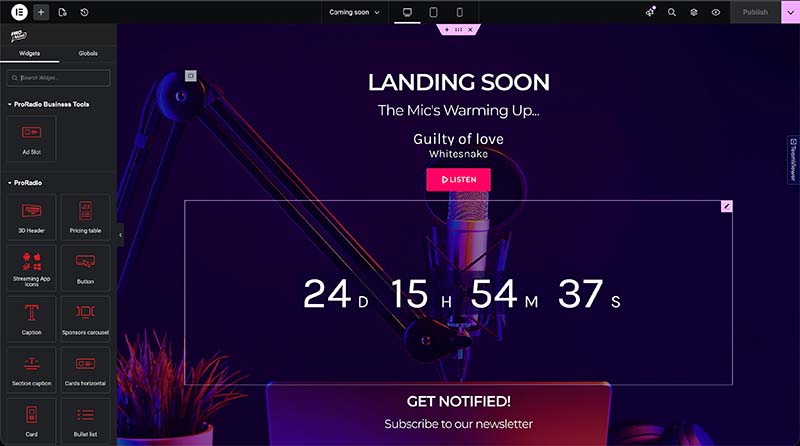
In addition, your coming soon page can still display the essential features your listeners need to enjoy the music, such as a player, track titles, artwork, and the current show name.
Video tutorial: How to Create a Radio Station Coming Soon page with Elementor:
Check out the video tutorial at this link.
How to create a perfect radio station coming soon page with Pro Radio
- Create a new page
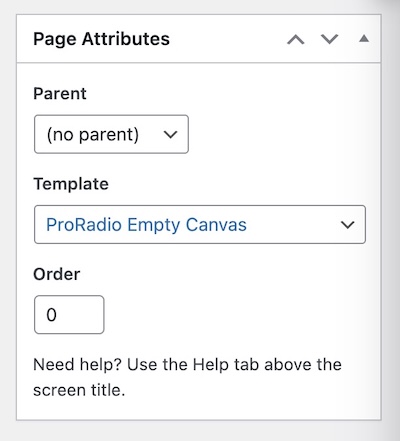
- From the right menu, under Templates, choose Pro Radio Empty Canvas (Important: not Elementor Canvas).
- Publish the page, then edit it with Elementor.
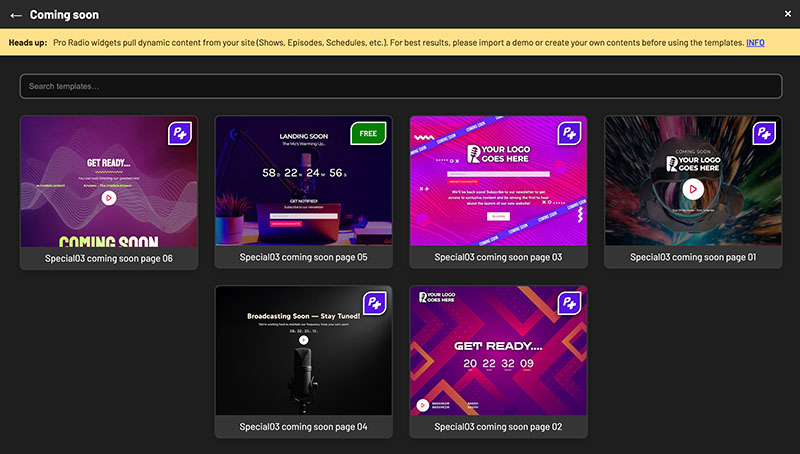
- To use a ready-made coming soon page, click the P+ icon to open the Pro Radio Plus Library. It includes multiple Coming Soon pages designed for radio stations.
- To build your own page, add a container, set it to full-screen height, and design the layout as needed.
- Publish
- Go to Settings > Reading, then select this page from the Coming Soon dropdown.
Only administrators will be able to view the website normally. For regular visitors, every page will redirect to your selected coming soon page until you disable it.
This lets you put the site in maintenance mode without blocking essential features such as the music player, radio shows, newsletter, or contact forms.
To access our exclusive library of Coming Soon pages, and 400+ more Elementor radio station templates for your homepage, radio shows, podcasts and more, upgrade to Pro Radio Plus: a world of advantages and all premium plugins from Pro Radio, in a single place.